A service is scalable if increasing the resources in a system, results in increased performance proportionally to resources added.
Generally, increasing performance means serving more units of work, or larger units of work, such as when datasets grow.
- Scalability is the capability of a system, process, or a network to grow and manage increased demand. Any distributed system that can continuously evolve in order to support the growing amount of work is considered to be scalable.
- A system may have to scale because of many reasons like increased data volume or increased amount of work, e.g., number of transactions. A scalable system would like to achieve this scaling without performance loss.
- Generally, the performance of a system, although designed (or claimed) to be scalable, declines with the system size due to the management or environment cost. For instance, network speed may become slower because machines tend to be far apart from one another. More generally, some tasks may not be distributed, either because of their inherent atomic nature or because of some flaw in the system design. At some point, such tasks would limit the speed-up obtained by distribution. A scalable architecture avoids this situation and attempts to balance the load on all the participating nodes evenly.
- your system is fast for a single user but slow under heavy load.
- your system is slow for a single user.
- By definition, reliability is the probability a system will fail in a given period.
- In simple terms, a distributed system is considered reliable if it keeps delivering its services even when one or several of its software or hardware components fail. Reliability represents one of the main characteristics of any distributed system, since in such systems any failing machine can always be replaced by another healthy one, ensuring the completion of the requested task.
- Take the example of a large electronic commerce store (like Amazon), where one of the primary requirement is that any user transaction should never be canceled due to a failure of the machine that is running that transaction. For instance, if a user has added an item to their shopping cart, the system is expected not to lose it. A reliable distributed system achieves this through redundancy of both the software components and data. If the server carrying the user’s shopping cart fails, another server that has the exact replica of the shopping cart should replace it.
- Obviously, redundancy has a cost and a reliable system has to pay that to achieve such resilience for services by eliminating every single point of failure.
- By definition, availability is the time a system remains operational to perform its required function in a specific period. It is a simple measure of the percentage of time that a system, service, or a machine remains operational under normal conditions.
- An aircraft that can be flown for many hours a month without much downtime can be said to have a high availability. Availability takes into account maintainability, repair time, spares availability, and other logistics considerations. If an aircraft is down for maintenance, it is considered not available during that time.
- Reliability is availability over time considering the full range of possible real-world conditions that can occur. An aircraft that can make it through any possible weather safely is more reliable than one that has vulnerabilities to possible conditions.
- To understand how to measure the efficiency of a distributed system, let’s assume we have an operation that runs in a distributed manner and delivers a set of items as result. Two standard measures of its efficiency are the response time (or latency) that denotes the delay to obtain the first item and the throughput (or bandwidth) which denotes the number of items delivered in a given time unit (e.g., a second). The two measures correspond to the following unit costs:
- Number of messages globally sent by the nodes of the system regardless of the message size.
- Size of messages representing the volume of data exchanges.
- The complexity of operations supported by distributed data structures (e.g., searching for a specific key in a distributed index) can be characterized as a function of one of these cost units.
- Generally speaking, the analysis of a distributed structure in terms of ‘number of messages’ is over-simplistic. It ignores the impact of many aspects, including the network topology, the network load, and its variation, the possible heterogeneity of the software and hardware components involved in data processing and routing, etc. However, it is quite difficult to develop a precise cost model that would accurately take into account all these performance factors; therefore, we have to live with rough but robust estimates of the system behavior.
- the time to perform some action or to produce some result.
- the number of such actions or results per unit of time.
Latency and throughput
- Another important consideration while designing a distributed system is how easy it is to operate and maintain. Serviceability or manageability is the simplicity and speed with which a system can be repaired or maintained; if the time to fix a failed system increases, then availability will decrease.
- Things to consider for manageability are the ease of diagnosing and understanding problems when they occur, ease of making updates or modifications, and how simple the system is to operate (i.e., does it routinely operate without failure or exceptions?).
Early detection of faults can decrease or avoid system downtime. For example, some enterprise systems can automatically call a service center (without human intervention) when the system experiences a system fault.
- Horizontal scaling means that you scale by adding more servers into your pool of resources whereas Vertical scaling means that you scale by adding more power (CPU, RAM, Storage, etc.) to an existing server.
- With horizontal-scaling it is often easier to scale dynamically by adding more machines into the existing pool; Vertical-scaling is usually limited to the capacity of a single server and scaling beyond that capacity often involves downtime and comes with an upper limit.
- Good examples of horizontal scaling are Cassandra and MongoDB as they both provide an easy way to scale horizontally by adding more machines to meet growing needs.
- Similarly, a good example of vertical scaling is MySQL as it allows for an easy way to scale vertically by switching from smaller to bigger machines. However, this process often involves downtime.

Vertical scaling vs. Horizontal scaling
- If a system is reliable, it is available. However, if it is available, it is not necessarily reliable. In other words, high reliability contributes to high availability, but it is possible to achieve a high availability even with an unreliable product by minimizing repair time and ensuring that spares are always available when they are needed.
- Let’s take the example of an online retail store that has 99.99% availability for the first two years after its launch. However, the system was launched without any information security testing. The customers are happy with the system, but they don’t realize that it isn’t very reliable as it is vulnerable to likely risks. In the third year, the system experiences a series of information security incidents that suddenly result in extremely low availability for extended periods of time. This results in reputational and financial damage to the customers.
- you can only have two out of the following three guarantees across a write/read pair:

In other words a distributed system only support two of the following guarantees:
- Every read receives the most recent write or an error
- Every request receives a response, without guarantee that it contains the most recent version of the information
- The system continues to operate despite arbitrary partitioning due to network failures
- Will wait for a response from the partitioned node which could result in a timeout error. The system can also choose to return an error, depending on the scenario you desire.
- when your business requirements dictate atomic reads and writes.
- will return the most recent version of the data you have, which could be stale. This system state will also accept writes that will take some time to propagate when the partition is resolved.
- your business requirements allow for some flexibility around when the data in the system synchronizes. Availability is also a compelling option when the system needs to continue to function in spite of external errors (shopping carts, etc.)
- Highly available
- Consistency can take a hit in favor of availability, if a news feed does not show up for a little while, it should be fine.

- After a write, reads may or may not see it. A best effort approach is taken.
- MemcacheDB
- VoIP, video chat, and realtime multiplayer games. For example, if you are on a phone call and lose reception for a few seconds, when you regain connection you do not hear what was spoken during connection loss.
"Message in a bottle"
- After a write, reads will eventually see it (typically within milliseconds). Data is replicated asynchronously.
- DNS and Email. And snail mail 📭
- Eventual consistency works well in highly available systems.
- After a write, reads will see it. Data is replicated synchronously.
- This approach is seen in file systems and RDBMSes. Strong consistency works well in systems that need transactions.
- Failover and Replication
- heartbeats are sent between the active and the passive server on standby. If the heartbeat is interrupted, the passive server takes over the active’s IP address and resumes service.
- whether the passive server is already running in ‘hot’ standby or whether it needs to start up from ‘cold’ standby. Only the active server handles traffic.
- AKA Master-Slave failover
- 💞 both servers are managing traffic, spreading the load between them.
☎️ the DNS would need to know about the public IPs of both servers.
🗃 application logic would need to know about both servers.
- AKA Master-Master failover.
- If the active system fails before any newly written data can be replicated to the passive, there is a potential for loss of data
- Failover adds more hardware and additional complexity.
Calculating Availability
If a service consists of multiple components prone to failure, the service’s overall availability depends on whether the components are in sequence or in parallel.
- 8h 45min 57s
- 43m 49.7s
- 10m 4.8s
- 1m 26.4s
- 52min 35.7s
- 4m 23s
- 1m 5s
- 8.6s
- Overall availability decreases when two components with availability < 100% are in sequence:
Availability (Total) = Availability (Foo) * Availability (Bar)- If both
FooandBareach had 99.9% availability, their total availability in sequence would be 99.8%.
- Overall availability increases when two components with availability < 100% are in parallel:
Availability (Total) = 1 - (1 - Availability (Foo)) * (1 - Availability (Bar))- If both
FooandBareach had 99.9% availability, their total availability in parallel would be 99.9999%.
Redundancy is the duplication of critical components or functions of a system with the intention of increasing the reliability of the system, usually in the form of a backup or fail-safe, or to improve actual system performance.
- For example, if there is only one copy of a file stored on a single server, then losing that server means losing the file. Since losing data is seldom a good thing, we can create duplicate or redundant copies of the file to solve this problem.
Redundancy plays a key role in removing the single points of failure in the system and provides backups if needed in a crisis. For example, if we have two instances of a service running in production and one fails, the system can failover to the other one.

Replication means sharing information to ensure consistency between redundant resources, such as software or hardware components, to improve reliability, fault-tolerance, or accessibility.
Replication is widely used in many database management systems (DBMS), usually with a master-slave relationship between the original and the copies. The master gets all the updates, which then ripple through to the slaves. Each slave outputs a message stating that it has received the update successfully, thus allowing the sending of subsequent updates.
- is a collection of data items organized in tables.

Source: Scaling up to your first 10 million users
- Each transaction is all or nothing.
An atomic transaction is an indivisible and irreducible series of database operations such that either all occur, or nothing occurs.
- Any transaction will bring the database from one valid state to another
- As an ACID guarantee, it can be defined in various ways:
1. The guarantee that any transactions started in the future necessarily see the effects of other transactions committed in the past 2. The guarantee that database constraints are not violated, particularly once a transaction commits 3. The guarantee that operations in transactions are performed accurately, correctly, and with validity, with respect to application semantics
- Executing transactions concurrently has the same results as if the transactions were executed serially
- Once a transaction has been committed, it will remain that way.
- a single unit of logic or work, sometimes made up of multiple operations.
- Example: a transfer from one bank account to another: the complete transaction requires subtracting the amount to be transferred from one account and adding that same amount to the other.
- Consistency over availability
MySQL, Oracle, MS SQL Server, SQLite, Postgres, and MariaDB
- are a collection of data items
- Data are denormalized
- Joins are generally done in the application code.
- Most NoSQL stores lack true ACID transactions and favor eventual consistency.
- the system guarantees availability.
- the state of the system may change over time, even without input.
- the system will become consistent over a period of time, given that the system doesn’t receive input during that period.
- availability over consistency.
- Key-value store generally allows for O(1) reads and writes and is often backed by memory or SSD.
- Key-value stores can maintain keys in lexicographic order, allowing efficient retrieval of key ranges.
- Key-value stores can allow for storing of metadata with a value.
- Key-value stores provide high performance and are often used for simple data models or for rapidly-changing data, such as an in-memory cache layer. Since they offer only a limited set of operations, complexity is shifted to the application layer if additional operations are needed.
- A key-value store is the basis for more complex systems such as a document store, and in some cases, a graph database.
- Redis
- Memcached
- Dynamo
- Voldemort
- A document store is centered around documents (XML, JSON, binary, etc), where a document stores all information for a given object.
- Document stores provide APIs or a query language to query based on the internal structure of the document itself.
- Note, many key-value stores include features for working with a value’s metadata, blurring the lines between these two storage types.
- Based on the underlying implementation, documents are organized by collections, tags, metadata, or directories.
- Although documents can be organized or grouped together, documents may have fields that are completely different from each other.
- Some document stores like MongoDB and CouchDB also provide a SQL-like language to perform complex queries. DynamoDB supports both key-values and documents.
- Document stores provide high flexibility and are often used for working with occasionally changing data.
- MongoDB
- CouchDB
- We’ve followed the Dynamo model made famous by Amazon where a database is divided into a number of equal, but separate, pieces, which we refer to as shards.
- Any given document belongs to one shard, and this is determined directly from its ID (and only its ID).
- This arrangement means that any node in the CouchDB cluster knows exactly where any document is hosted, allowing for scalable reading and writing. In addition, CouchDB 2.0 keeps multiple copies of each shard, so that the loss of any individual node is not fatal.
- When creating a database, you can specify the number of shards (with ?q=) and the number of copies of those shards (with ?n=) or use the defaults.
- The default N is 3 which is almost always the right value, fewer is too risky, greater is too expensive.
- The default Q is 8 and this is suitable for most uses. You are well advised to raise this number if your database will be large, or if you plan to increase the size of your cluster significantly over time.
- As a rule of thumb, aim for no more than 10 million documents per shard.

Source: SQL & NoSQL, a brief history
- A wide column store’s basic unit of data is a column (name/value pair).
- A column can be grouped in column families (analogous to a SQL table). Super column families further group column families.
- You can access each column independently with a row key, and columns with the same row key form a row. Each value contains a timestamp for versioning and for conflict resolution.
- Google introduced Bigtable as the first wide column store, which influenced the open-source HBase often-used in the Hadoop ecosystem, and Cassandra from Facebook. Stores such as BigTable, HBase, and Cassandra maintain keys in lexicographic order, allowing efficient retrieval of selective key ranges.
- Wide column stores offer high availability and high scalability. They are often used for analyzing very large data sets.
- Bigtable
- HBase
- Cassandra

- In a graph database, Data (each record) is saved in graph structures as nodes (entities), properties (information about the entities), and lines/arcs (connections between the entities)
- Graph databases are optimized to represent complex relationships with many foreign keys or many-to-many relationships.
- Many graphs can only be accessed with REST APIs.
- Graphs databases offer high performance for data models with complex relationships, such as a social network. They are relatively new and are not yet widely-used; it might be more difficult to find development tools and resources.
- Neo4j
- FlockDB
- Infinite Graph
- SQL stores data in tables where each row represents an entity and each column represents a data point about that entity; for example, if we are storing a car entity in a table, different columns could be ‘Color’, ‘Make’, ‘Model’, and so on.
- NoSQL databases have different data storage models. The main ones are key-value, document, graph, and columnar. We will discuss differences between these databases below.
- In SQL, each record conforms to a fixed schema, meaning the columns must be decided and chosen before data entry and each row must have data for each column. The schema can be altered later, but it involves modifying the whole database and going offline.
- In NoSQL, schemas are dynamic. Columns can be added on the fly and each ‘row’ (or equivalent) doesn’t have to contain data for each ‘column.’
- SQL databases use SQL (structured query language) for defining and manipulating the data, which is very powerful. In a NoSQL database, queries are focused on a collection of documents. Sometimes it is also called UnQL (Unstructured Query Language). Different databases have different syntax for using UnQL.
- In most common situations, SQL databases are vertically scalable, i.e., by increasing the horsepower (higher Memory, CPU, etc.) of the hardware, which can get very expensive. It is possible to scale a relational database across multiple servers, but this is a challenging and time-consuming process.
- On the other hand, NoSQL databases are horizontally scalable, meaning we can add more servers easily in our NoSQL database infrastructure to handle a lot of traffic. Any cheap commodity hardware or cloud instances can host NoSQL databases, thus making it a lot more cost-effective than vertical scaling. A lot of NoSQL technologies also distribute data across servers automatically.
- The vast majority of relational databases are ACID compliant. So, when it comes to data reliability and safe guarantee of performing transactions, SQL databases are still the better bet.Most of the NoSQL solutions sacrifice ACID compliance for performance and scalability.

- Distinction between SQL vs. NoSQL is NOT always clear
- One is NOT better than the other, and there’s no one-size-fits-all solution.
- Even as NoSQL databases are gaining popularity for their speed and scalability, there are still situations where a highly structured SQL database may perform better
- SQL is deceptively simple and powerful whereas NoSQL can get deceptively complex
- Structured, relational data
- If your business is not experiencing massive growth that would require more servers and if you’re only working with data that is consistent, then there may be no reason to use a system designed to support a variety of data types and high traffic volume.
- Static or Strict schema
- Relational data
- Need for complex joins
- Transactions
- Clear patterns for scaling
- More established: developers, community, code, tools, etc
- Lookups by index are very fast
for e-commerce and financial applications, an ACID-compliant database remains the preferred option.
- Semi-structured, non relational data, lots of it
- Dynamic or flexible schema
- No need for complex joins
- Store many TB (or PB) of data
- Very data intensive workload
- Very high throughput for IOPS
- Making the most of cloud computing and storage. Cloud-based storage is an excellent cost-saving solution but requires data to be easily spread across multiple servers to scale up. Many NoSQL data bases like Cassandra come out ready to scale right out of the box
- Rapid development. NoSQL is extremely useful for rapid development as it doesn’t need to be prepped ahead of time. If you’re working on quick iterations of your system which require making frequent updates to the data structure without a lot of downtime between versions, a relational database will slow you down.
- Rapid ingest of clickstream and log data
- Leaderboard or scoring data
- Temporary data, such as a shopping cart
- Frequently accessed (‘hot’) tables
- Metadata/lookup tables
- The naive approach:
- Replication, when there is too much load
- Partitioning, when there is too much data

Source: Scaling Databases
- There is a potential for loss of data if the master fails before any newly written data can be replicated to other nodes.
- Writes are replayed to the read replicas. If there are a lot of writes, the read replicas can get bogged down with replaying writes and can’t do as many reads.
- The more read slaves, the more you have to replicate, which leads to greater replication lag.
- On some systems, writing to the master can spawn multiple threads to write in parallel, whereas read replicas only support writing sequentially with a single thread.
- Replication adds more hardware and additional complexity.
- serves reads and writes
- replicates writes to slaves
- only serve reads
- can also replicate to additional slaves in a tree-like fashion

- the system will continue to operate in read-only mode until a slave is promoted to a master or a new master is provisioned.

- Additional logic is needed to promote a slave to a master.
- See Disadvantage(s): replication for points related to both master-slave and master-master.
- serve reads and writes
- coordinate with each other on writes
- the system can continue to operate with both reads and writes

- You’ll need a load balancer or you’ll need to make changes to your application logic to determine where to write.
- Most master-master systems are either loosely consistent (violating ACID) or have increased write latency due to synchronization.
- Conflict resolution comes more into play as more write nodes are added and as latency increases.
- See Disadvantage(s): replication for points related to both master-slave and master-master.
- It is a technique to break up a big database (DB) into many smaller parts. It is the process of splitting up a DB/table across multiple machines to improve the manageability,
The justification for data partitioning is that, after a certain scale point, it is cheaper and more feasible to scale horizontally by adding more machines than to grow it vertically by adding beefier servers.
- In this strategy, each partition holds a subset of the fields for items in the data store. The fields are divided according to their pattern of use.
- A common form/example of vertical partitions is when we put, frequently accessed, but static (like a facebook profile name or profile pict), fields fields might be placed in one vertical partition and less frequently accessed, but dynamic (like a facebook profile's page likes), fields in another.

- In this example, the application regularly queries the product name, description, and price when displaying the product details to customers. Stock count and last- ordered date are held in a separate partition because these two items are commonly used together.
- 👍 & 👎 Creating a view across the two newly created tables restores the original table with a performance penalty, however performance will increase when accessing the static data e.g., for statistical analysis.
- 👍 Vertical partitioning is straightforward to implement and has a low impact on the application.
- 👎 The main problem with this approach is that if our application experiences additional growth, then it may be necessary to further partition a feature specific DB across various servers (e.g. it would not be possible for a single server to handle all the metadata queries for 10 billion photos by 140 million users).
- In this scheme, we put different rows into different tables.
- Sharding distributes data across different databases such that each database can only manage a subset of the data.
- For example, if we are storing different places in a table, we can decide that locations with ZIP codes less than 10000 are stored in one table and places with ZIP codes greater than 10000 are stored in a separate table. This is also called a range based partitioning as we are storing different ranges of data in separate tables.

- Similar to the advantages of federation, sharding results in less read and write traffic, less replication, and more cache hits.
- Index size is also reduced, which generally improves performance with faster queries.
- If one shard goes down, the other shards are still operational, although you’ll want to add some form of replication to avoid data loss.
- Like federation, there is no single central master serializing writes, allowing you to write in parallel with increased throughput.
- The key problem with this approach is that if the value whose range is used for partitioning isn’t chosen carefully, then the partitioning scheme will lead to unbalanced servers. In the previous example, splitting location based on their zip codes assumes that places will be evenly distributed across the different zip codes. This assumption is not valid as there will be a lot of places in a thickly populated area like Manhattan as compared to its suburb cities.
- I.O.W. Data distribution can become lopsided in a shard. For example, a set of power users on a shard could result in increased load to that shard compared to others.
- Rebalancing adds additional complexity. A sharding function based on consistent hashing can reduce the amount of transferred data.
- You’ll need to update your application logic to work with shards, which could result in complex SQL queries.
- Joining data from multiple shards is more complex.
- Sharding adds more hardware and additional complexity.
- Common ways to shard a table (of users) is either through the user’s last name initial or the user’s geographic location.

In this example, product inventory data is divided into shards based on the product key. Each shard holds the data for a contiguous range of shard keys (A-G and H-Z), organized alphabetically. Sharding spreads the load over more computers, which reduces contention and improves performance.
- Federation (or functional partitioning) splits up databases by function.

- Results in less read and write traffic to each database and therefore less replication lag.
- Smaller databases result in more data that can fit in memory, which in turn results in more cache hits due to improved cache locality.
- With no single central master serializing writes you can write in parallel, increasing throughput.
- Federation is not effective if your schema requires huge functions or tables.
- You’ll need to update your application logic to determine which database to read and write.
- Joining data from two databases is more complex with a server link.
- Federation adds more hardware and additional complexity.
Solutions
A loosely coupled approach to work around issues mentioned in the above schemes is to create a lookup service which knows your current partitioning scheme and abstracts it away from the DB access code. So, to find out where a particular data entity resides, we query the directory server that holds the mapping between each tuple key to its DB server. This loosely coupled approach means we can perform tasks like adding servers to the DB pool or changing our partitioning scheme without having an impact on the application.
Under this scheme, we apply a hash function to some key attributes of the entity we are storing; that yields the partition number. For example, if we have 100 DB servers and our ID is a numeric value that gets incremented by one each time a new record is inserted. In this example, the hash function could be ‘ID % 100’, which will give us the server number where we can store/read that record. This approach should ensure a uniform allocation of data among servers.
The fundamental problem with this approach is that it effectively fixes the total number of DB servers, since adding new servers means changing the hash function which would require redistribution of data and downtime for the service. A workaround for this problem is to use Consistent Hashing.
In this scheme, each partition is assigned a list of values, so whenever we want to insert a new record, we will see which partition contains our key and then store it there. For example, we can decide all users living in Iceland, Norway, Sweden, Finland, or Denmark will be stored in a partition for the Nordic countries.
This is a very simple strategy that ensures uniform data distribution. With ‘n’ partitions, the ‘i’ tuple is assigned to partition (i mod n).
Under this scheme, we combine any of the above partitioning schemes to devise a new scheme. For example, first applying a list partitioning scheme and then a hash based partitioning. Consistent hashing could be considered a composite of hash and list partitioning where the hash reduces the key space to a size that can be listed.
On a partitioned database, there are certain extra constraints on the different operations that can be performed. Most of these constraints are due to the fact that operations across multiple tables or multiple rows in the same table will no longer run on the same server. Below are some of the constraints and additional complexities introduced by partitioning:
Performing joins on a database which is running on one server is straightforward, but once a database is partitioned and spread across multiple machines it is often not feasible to perform joins that span database partitions. Such joins will not be performance efficient since data has to be compiled from multiple servers.
A common workaround for this problem is to denormalize the database so that queries that previously required joins can be performed from a single table. Of course, the service now has to deal with all the perils of denormalization such as data inconsistency.
As we saw that performing a cross-partition query on a partitioned database is extremely difficult, similarly, trying to enforce data integrity constraints such as foreign keys in a partitioned database can be extremely difficult.
Most of RDBMS do not support foreign keys constraints across databases on different database servers. Which means that applications that require referential integrity on partitioned databases often have to enforce it in application code. Often in such cases, applications have to run regular SQL jobs to clean up dangling references.
There could be many reasons we have to change our partitioning scheme:
- The data distribution is not uniform, e.g., there are a lot of places for a particular ZIP code that cannot fit into one database partition.
- There is a lot of load on a partition, e.g., there are too many requests being handled by the DB partition dedicated to user photos.
In such cases, either we have to create more DB partitions or have to rebalance existing partitions, which means the partitioning scheme changed and all existing data moved to new locations. Doing this without incurring downtime is extremely difficult. Using a scheme like directory based partitioning does make rebalancing a more palatable experience at the cost of increasing the complexity of the system and creating a new single point of failure (i.e. the lookup service/database).
Denormalization
- In most systems, reads can heavily outnumber writes 100:1 or even 1000:1. So a read resulting in a complex database join can be very expensive, spending a significant amount of time on disk operations.
- Denormalization attempts to improve read performance at the expense of some write performance. Redundant copies of the data are written in multiple tables to avoid expensive joins.
- Once data becomes distributed with techniques such as federation and sharding, managing joins across data centers further increases complexity. Denormalization might circumvent the need for such complex joins.
- Data is duplicated.
- Constraints can help redundant copies of information stay in sync, which increases complexity of the database design.
- A denormalized database under heavy write load might perform worse than its normalized counterpart.
In practice, RDBMS such as PostgreSQL and Oracle support materialized views which handle the work of storing redundant information and keeping redundant copies consistent.
SQL tuning
- SQL tuning is a broad topic and many books have been written as reference.
- Benchmark - Simulate high-load situations with tools such as ab.
- Profile - Enable tools such as the slow query log to help track performance issues.
Benchmarking and profiling might point you to the following optimizations.
- One of the very first things you should turn to when that (when db performance is no longer satisfactory) happens is database indexing.
- The goal of creating an index on a particular table in a database is to make it faster to search through the table and find the row or rows that we want. Indexes can be created using one or more columns of a database table, providing the basis for both rapid random lookups and efficient access of ordered records.
A library catalog is a register that contains the list of books found in a library. The catalog is organized like a database table generally with four columns: book title, writer, subject, and date of publication.
There are usually two such catalogs: one sorted by the book title and one sorted by the writer name.
That way, you can either think of a writer you want to read and then look through their books or look up a specific book title you know you want to read in case you don’t know the writer’s name.
These catalogs are like indexes for the database of books. They provide a sorted list of data that is easily searchable by relevant information.
Simply saying, an index is a data structure that can be perceived as a table of contents that points us to the location where actual data lives. So when we create an index on a column of a table, we store that column and a pointer to the whole row in the index.
Let’s assume a table containing a list of books, the following diagram shows how an index on the ‘Title’ column looks like:

In the case of data sets that are many terabytes in size, but have very small payloads (e.g., 1 KB), indexes are a necessity for optimizing data access.
Finding a small payload in such a large dataset can be a real challenge, since we can’t possibly iterate over that much data in any reasonable time. Furthermore, it is very likely that such a large data set is spread over several physical devices—this means we need some way to find the correct physical location of the desired data. Indexes are the best way to do this.
- Columns that you are querying (
SELECT,GROUP BY,ORDER BY,JOIN) could be faster with indices. - Indices are usually represented as self-balancing B-tree that keeps data sorted and allows searches, sequential access, insertions, and deletions in logarithmic time.
- Placing an index can keep the data in memory, requiring more space.
- Writes could also be slower since the index also needs to be updated.
- When loading large amounts of data, it might be faster to disable indices, load the data, then rebuild the indices.
An index can dramatically speed up data retrieval but may itself be large due to the additional keys, which slow down data insertion & update.
When adding rows or making updates to existing rows for a table with an active index, we not only have to write the data but also have to update the index. This will decrease the write performance. This performance degradation applies to all insert, update, and delete operations for the table. For this reason, adding unnecessary indexes on tables should be avoided and indexes that are no longer used should be removed. To reiterate, adding indexes is about improving the performance of search queries. If the goal of the database is to provide a data store that is often written to and rarely read from, in that case, decreasing the performance of the more common operation, which is writing, is probably not worth the increase in performance we get from reading.
For more details, see Database Indexes.
- MySQL dumps to disk in contiguous blocks for fast access.
- Use
CHARinstead ofVARCHARfor fixed-length fields. CHAReffectively allows for fast, random access, whereas withVARCHAR, you must find the end of a string before moving onto the next one.- Use
TEXTfor large blocks of text such as blog posts.TEXTalso allows for boolean searches. Using aTEXTfield results in storing a pointer on disk that is used to locate the text block. - Use
INTfor larger numbers up to 2^32 or 4 billion. - Use
DECIMALfor currency to avoid floating point representation errors. - Avoid storing large
BLOBS, store the location of where to get the object instead. VARCHAR(255)is the largest number of characters that can be counted in an 8 bit number, often maximizing the use of a byte in some RDBMS.- Set the
NOT NULLconstraint where applicable to improve search performance.
- Break up a table by putting hot spots in a separate table to help keep it in memory.
- In some cases, the query cache could lead to performance issues.
- Denormalize where performance demands it.
- TCP is a connection-oriented protocol over an IP network.

Source: How to make a multiplayer game
- Connection is established and terminated using a handshake.
- All packets sent are guaranteed to reach the destination in the original order and without corruption.
- Sequence numbers and checksum fields for each packet
- Acknowledgement packets and automatic retransmission
- If the sender does not receive a correct response, it will resend the packets. If there are multiple timeouts, the connection is dropped. TCP also implements flow control and congestion control.
- These guarantees cause delays and generally result in less efficient transmission than UDP.
- To ensure high throughput, web servers can keep a large number of TCP connections open, resulting in high memory usage.
- It can be expensive to have a large number of open connections between web server threads and say, a memcached server.
- Connection pooling can help in addition to switching to UDP where applicable.
- applications that require high reliability but are less time critical. Some examples include web servers, database info, SMTP, FTP, and SSH.

Source: How to make a multiplayer game
- UDP is a connectionless protocol.
- Datagrams (analogous to packets) are guaranteed only at the datagram level.
- Datagrams might reach their destination out of order or not at all.
- UDP does not support congestion control.
- Without the guarantees that TCP support, UDP is generally more efficient.
- UDP can broadcast, sending datagrams to all devices on the subnet.
- This is useful with DHCP because the client has not yet received an IP address, thus preventing a way for TCP to stream without the IP address.
- VoIP, video chat, streaming, and realtime multiplayer games.
- You need all of the data to arrive intact
- You want to automatically make a best estimate use of the network throughput
- You need the lowest latency
- Late data is worse than loss of data
- You want to implement your own error correction
- It is a request/response protocol: clients issue requests and servers issue responses with relevant content and completion status info about the request.
- HTTP is a method for encoding and transporting data between a client and a server.
- HTTP is self-contained, allowing requests and responses to flow through many intermediate routers and servers that perform load balancing, caching, encryption, and compression.
- HTTP is an application layer protocol relying on lower-level (transport layer) protocols such as TCP and UDP.
- A basic HTTP request consists of a verb (method) + a resource (endpoint).
Request Method | Idempotent* | Safe | Cacheable | Description | Attributes |
|---|---|---|---|---|---|
DELETE | Deletes a resource | idempotent | |||
PATCH | Partially updates a resource | ||||
PUT | Creates or replace a resource | idempotent | |||
POST | Creates a resource or trigger a process that handles data | ||||
GET | Reads a resource | cacheableidempotentsafe |
- Can be called many times without different outcomes.
- An HTTP method is safe if it doesn't alter the state of the server. In other words, a method is safe if it leads to a read-only operation.

Long-Polling, WebSockets, and Server-Sent Events are popular communication protocols between a client like a web browser and a web server. First, let’s start with understanding what a standard HTTP web request looks like.
- The client opens a connection (TCP or other)
- The client sends the request for data from the server.
- The server processes/prepares the response and sends a response back to the client on the opened request.

Caption: HTTP Protocol
- Polling is a standard technique used by the vast majority of AJAX applications.
- The basic idea is that the client repeatedly polls (or requests) a server for data.
- The client makes a request and waits for the server to respond with data.
- If no data is available, an empty response is returned.
- The client opens a connection and requests data from the server using regular HTTP.
- The requested webpage sends requests to the server at regular intervals (e.g., 0.5 seconds).
- The server calculates the response and sends it back, just like regular HTTP traffic.
- The client repeats the above three steps periodically to get updates from the server.

Caption: Ajax Polling Protocol
- This is a variation of the traditional polling technique that allows the server to push information to a client whenever the data is available.
- With Long-Polling, the client requests information from the server exactly as in normal polling, but with the expectation that the server may not respond immediately.
- That’s why this technique is sometimes referred to as a “Hanging GET”.
- If the server does not have any data available for the client, instead of sending an empty response, the server holds the request and waits until some data becomes available.
- Once the data becomes available, a full response is sent to the client. The client then immediately re-request information from the server so that the server will almost always have an available waiting request that it can use to deliver data in response to an event.
- The client makes an initial request using regular HTTP and then waits for a response.
- The server delays its response until an update is available or a timeout has occurred.
- When an update is available, the server sends a full response to the client.
- The client typically sends a new long-poll requst, either immediately upon receiving a response or after a pause to allow an acceptable latency period.
- Each Long-Poll request has a timeout. The client has to reconnect periodically after the connection is closed due to timeouts.

Caption: Long Polling Protocol
- WebSocket is a computer communications protocol that provides Full duplex communication channels over a single persistent TCP connection.
- It provides a persistent connection between a client and a server that both parties can use to start sending data at any time.
- 👍 The WebSocket protocol enables communication between a client and a server with lower overheads, facilitating real-time data transfer from and to the server.
- This is made possible by providing a standardized way for the server to send content to the browser without being asked by the client and allowing for messages to be passed back and forth while keeping the connection open.
- In this way, a two-way (bi-directional) ongoing conversation can take place between a client and a server.
- The client establishes a WebSocket connection through a process known as the WebSocket handshake.
- If the process succeeds, then the server and client can exchange data in both directions at any time.

Caption: WebSockets Protocol

- The client sends a regular HTTP request with some special headers like so:

What do these headers in a Client handshake request mean?
- signals that the client would like to change the protocol.
- the requested protocol is “websocket"
- a random browser-generated key for security.
- WebSocket protocol version, 13 is the current one.
- The server will respond with an HTTP Response like below.
- The response code should be 101

After the client receives the server response, the WebSocket connection is open to start transmitting data.
- Server-Sent Events (SSE) is a server push technology enabling a client to receive automatic updates from a server via HTTP connection.
- Under SSEs the client establishes a persistent and long-term connection with the server. The server uses this connection to send data to a client.
- 👎 If the client wants to send data to the server, it would require the use of another technology/protocol to do so.
- Client requests data from a server using regular HTTP.
- The requested webpage opens a connection to the server.
- The server sends the data to the client whenever there’s new information available.

- SSEs are best when we need real-time traffic from the server to the client or if the server is generating data in a loop and will be sending multiple events to the client.

Caption: Server Sent Events Protocol
- In an RPC, a client causes a procedure to execute on a different address space, usually a remote server.
- The procedure is coded as if it were a local procedure call, abstracting away the details of how to communicate with the server from the client program.
- 👎 Remote calls are usually slower and less reliable than local calls so it is helpful to distinguish RPC calls from local calls.


- Calls the client stub procedure. The parameters are pushed onto the stack like a local procedure call.
- Marshals (packs) procedure id and arguments into a request message.
- OS sends the message from the client to the server.
- OS passes the incoming packets to the server stub procedure.
- Unmarshalls the results, calls the server procedure matching the procedure id and passes the given arguments.
- The server response repeats the steps above in reverse order.
- performance reasons with internal communications, as you can hand-craft native calls to better fit your use cases.
- You know your target platform.
- You want to control how your “logic” is accessed.
- You want to control how error control happens off your library.
- Performance and end user experience is your primary concern.
- 👎 RPC clients become tightly coupled to the service implementation.
- 👎 A new API must be defined for every new operation or use case.
- 👎 It can be difficult to debug RPC.
- 👎 You might not be able to leverage existing technologies out of the box. For example, it might require additional effort to ensure RPC calls are properly cached on caching servers such as Squid.
REST is an architectural style enforcing a client/server model where the client acts on a set of resources managed by the server.
The server provides a representation of resources and actions that can either manipulate or get a new representation of resources.
- 👍 It minimizes the coupling between client/server and is often used for public HTTP APIs.
- 👍 REST uses a more generic and uniform method of exposing resources through URIs, representation through headers, and actions through verbs such as GET, POST, PUT, DELETE, and PATCH.
- 👍 Being stateless, REST is great for horizontal scaling and partitioning.
- Identify resources (URI in HTTP) - use the same URI regardless of any operation.
- Stateless
- Cacheable
- Change with representations (Verbs in HTTP) - use verbs, headers, and body.
- Self-descriptive error message (status response in HTTP) - Use status codes, don’t reinvent the wheel.
- HATEOAS (HTML interface for HTTP) - your web service should be fully accessible in a browser.
- 👎 With REST being focused on exposing data, it might not be a good fit if resources are not naturally organized or accessed in a simple hierarchy. For example, returning all updated records from the past hour matching a particular set of events is not easily expressed as a path. With REST, it is likely to be implemented with a combination of URI path, query parameters, and possibly the request body.
- 👎 REST typically relies on a few verbs (GET, POST, PUT, DELETE, and PATCH) which sometimes doesn’t fit your use case. For example, moving expired documents to the archive folder might not cleanly fit within these verbs.
- 👎 Fetching complicated resources with nested hierarchies could require multiple round trips between the client and server to render single views, For example, fetching content of a blog entry and the comments on that entry. For mobile applications operating in variable network conditions, these multiple roundtrips are highly undesirable.
- 👎 Over time, more fields might be added to an API response and older clients will receive all new data fields, even those that they do not need, as a result, it could bloat the payload size and leads to larger latencies.
GET /someoperation?data=anId

POST /anotheroperation
{
  "data":"anId";
  "anotherdata": "another value"
}GET /someresources/anId
PUT /someresources/anId
{
"anotherdata": "another value"
}

- DNS is the phone book of the internet. A Domain Name System (DNS) translates a domain name such as www.espn.com to an IP address.

- hierarchical
- authoritative

Source: DNS security presentation
- Browser checks if the domain is in its cache. (to see the DNS Cache in Chrome, go to chrome://net-internals/#dns).
- If not found, the browser calls
gethostbynamelibrary function (varies by OS) to do the lookup. gethostbynamechecks if the hostname can be resolved by reference in the localhostsfile (whose location varies by OS) before trying to resolve the hostname through DNS.- If
gethostbynamedoes not have it cached nor can find it in thehostsfile then it makes a request to the DNS server configured in the network stack. - This is typically the local router or the ISP's caching DNS server.
- If the DNS server is on the same subnet the network library follows the
ARP processbelow for the DNS server. - If the DNS server is on a different subnet, the network library follows the
ARP processbelow for the default gateway IP.
- (name server) - Specifies the DNS servers for your domain/subdomain.
- (mail exchange) - Specifies the mail servers for accepting messages.
A record?- (address) - Points a name to an IP address.
- (canonical) - Points a name to another name or
CNAME(example.com to www.example.com) or to anArecord.
- Services such as CloudFlare and Route 53 provide managed DNS services
- Prevent traffic from going to servers under maintenance
- Balance between varying cluster sizes
- A/B testing
- Latency-based
- Geolocation-based
- Accessing a DNS server introduces a slight delay, although mitigated by caching described above.
- DNS server management could be complex and is generally managed by governments, ISPs, and large companies.
- DNS services have recently come under DDoS attack, preventing users from accessing websites such as Twitter without knowing Twitter’s IP address(es).
- Lower level DNS servers cache mappings, which could become stale due to DNS propagation delays.

A proxy server is an intermediate server between the client and the back-end server. Clients connect to proxy servers to make a request for a service like a web page, file, connection, etc.
In short, a proxy server is a piece of software or hardware that acts as an intermediary for requests from clients seeking resources from other servers.
Typically, proxies are used to filter requests, log requests, or sometimes transform requests (by adding/removing headers, encrypting/decrypting, or compressing a resource). Another advantage of a proxy server is that its cache can serve a lot of requests. If multiple clients access a particular resource, the proxy server can cache it and serve it to all the clients without going to the remote server.
Proxies can reside on the client’s local server or anywhere between the client and the remote servers. Here are a few famous types of proxy servers:
An open proxy is a proxy server that is accessible by any Internet user. Usually, proxy servers only allow users within a network group (i.e. a closed proxy) to store and forward Internet services such as DNS or web pages to reduce and control the bandwidth used by the group. With an open proxy, however, any user on the Internet is able to use this forwarding service. There two famous open proxy types:
- Thіs proxy reveаls іts іdentіty аs а server but does not dіsclose the іnіtіаl IP аddress. Though thіs proxy server cаn be dіscovered eаsіly іt cаn be benefіcіаl for some users аs іt hіdes their IP аddress.
- Thіs proxy server аgаіn іdentіfіes іtself, аnd wіth the support of HTTP heаders, the fіrst IP аddress cаn be vіewed. The mаіn benefіt of usіng thіs sort of server іs іts аbіlіty to cаche the websіtes.
A reverse proxy retrieves resources on behalf of a client from one or more servers. These resources are then returned to the client, appearing as if they originated from the proxy server itself
- A reverse proxy is a web server that centralizes internal services and provides unified interfaces to the public.
- Requests from clients are forwarded to a server that can fulfill it before the reverse proxy returns the server’s response to the client.

- Hide information about backend servers, blacklist IPs, limit number of connections per client
- Clients only see the reverse proxy’s IP, allowing you to scale servers or change their configuration
- Decrypt incoming requests and encrypt server responses so backend servers do not have to perform these potentially expensive operations
- Removes the need to install X.509 certificates on each server
- Compress server responses
- Return the response for cached requests
- HTML/CSS/JS
- Photos
- Videos
- Etc
- Introducing a reverse proxy results in increased complexity.
- A single reverse proxy is a single point of failure, configuring multiple reverse proxies (ie a failover) further increases complexity.

- Load balancers distribute incoming client requests to computing resources such as application servers and databases.
- Helps to spread the traffic across a cluster of servers to improve responsiveness and availability of applications, websites or databases.
- In each case, the load balancer returns the response from the computing resource to the appropriate client.
- LB also keeps track of the status of all the resources while distributing requests.
- If a server is not available to take new requests or is not responding or has elevated error rate, LB will stop sending traffic to such a server.
- 👍 By balancing application requests across multiple servers, a load balancer reduces individual server load and prevents any one application server from becoming a single point of failure, thus improving overall application availability and responsiveness.
- Between the user and the web server
- Typically a load balancer sits between the client and the server accepting incoming network and application traffic and distributing the traffic across multiple backend servers using various algorithms.
- Between web servers and an internal platform (application) layer, like application servers or cache servers
- Between internal platform (application) layer and database.

- Preventing requests from going to unhealthy servers
- Users won’t have to wait for a single struggling server to finish its previous tasks.
- Instead, their requests are immediately passed on to a more readily available resource.
- Even a full server failure won’t affect the end user experience as the load balancer will simply route around it to a healthy server.
- 3. Preventing overloading resources
- 4. Helping eliminate single points of failure
- Load balancing makes it easier for system administrators to handle incoming requests while decreasing wait time for users.
- System administrators experience fewer failed or stressed components. Instead of a single device performing a lot of work, load balancing has several devices perform a little bit of work.
Additional benefits include:
- Decrypt incoming requests and encrypt server responses so backend servers do not have to perform these potentially expensive operations
- Removes the need to install X.509 certificates on each server
Issue cookies and route a specific client’s requests to same instance if the web apps do not keep track of sessions
- Smart load balancers provide benefits like predictive analytics that determine traffic bottlenecks before they happen. As a result, the smart load balancer gives an organization actionable insights. These are key to automation and can help drive business decisions.
- The load balancer can become a performance bottleneck if it does not have enough resources or if it is not configured properly.
- Introducing a load balancer to help eliminate single points of failure results in increased complexity.
- A single load balancer is a single point of failure, configuring multiple load balancers further increases complexity.
- Load balancers can be implemented with hardware (expensive) or with software such as HAProxy.
- To protect against failures, it’s common to set up multiple load balancers, either in active-passive or active-active mode.
Redundant Load Balancers
The load balancer can be a single point of failure; to overcome this, a second load balancer can be connected to the first to form a cluster. Each LB monitors the health of the other and, since both of them are equally capable of serving traffic and failure detection, in the event the main load balancer fails, the second load balancer takes over.


Source: Scalable system design patterns
How does the load balancer choose the backend server? Load balancers consider two factors before forwarding a request to a backend server. They will first ensure that the server they choose is actually responding appropriately to requests (Health Checks) and then use a pre-configured algorithm to select one from the set of healthy servers. We will discuss these algorithms shortly.
- Load balancers should only forward traffic to “healthy” backend servers. To monitor the health of a backend server, “health checks” regularly attempt to connect to backend servers to ensure that servers are listening. If a server fails a health check, it is automatically removed from the pool, and traffic will not be forwarded to it until it responds to the health checks again.
- Random
- Least Connection Method — This method directs traffic to the server with the fewest active connections. This approach is quite useful when there are a large number of persistent client connections which are unevenly distributed between the servers.
- Least Response Time Method — This algorithm directs traffic to the server with the fewest active connections and the lowest average response time.
- Least Bandwidth Method - This method selects the server that is currently serving the least amount of traffic measured in megabits per second (Mbps).
- This method cycles through a list of servers and sends each new request to the next server. When it reaches the end of the list, it starts over at the beginning. It is most useful when the servers are of equal specification and there are not many persistent connections.
- The weighted round-robin scheduling is designed to better handle servers with different processing capacities. Each server is assigned a weight (an integer value that indicates the processing capacity). Servers with higher weights receive new connections before those with less weights and servers with higher weights get more connections than those with less weights.
- Under this method, a hash of the IP address of the client is calculated to redirect the request to a server.
- Layer 4 load balancers look at info at the transport layer to decide how to distribute requests. Generally, this involves the source, destination IP addresses, and ports in the header, but not the contents of the packet. Layer 4 load balancers forward network packets to and from the upstream server, performing Network Address Translation (NAT).
- At the cost of flexibility, layer 4 load balancing requires less time and computing resources than Layer 7, although the performance impact can be minimal on modern commodity hardware.
- Session/cookies
- Layer 7 load balancers look at the application layer to decide how to distribute requests. This can involve contents of the header, message, and cookies.
- Layer 7 load balancers terminates network traffic, reads the message, makes a load-balancing decision, then opens a connection to the selected server.
- For example, a layer 7 load balancer can direct video traffic to servers that host videos while directing more sensitive user billing traffic to security-hardened servers.
- At the cost of flexibility, layer 4 load balancing requires less time and computing resources than Layer 7, although the performance impact can be minimal on modern commodity hardware.
- Round robin or weighted round robin
- NGINX architecture
- HAProxy architecture guide
- Scalability
- Wikipedia
- Layer 4 load balancing
- Layer 7 load balancing
- ELB listener config
- Round Robin vs Weight Round Robin
- Following links have some good discussion about load balancers: [1] What is load balancing [2] Introduction to architecting systems [3] Load balancing
Horizontal scaling
- Load balancers can also help with horizontal scaling
- improves performance and availability.
- Scaling out using commodity machines is more cost efficient and results in higher availability than scaling up a single server on more expensive hardware, called Vertical Scaling.
- It is also easier to hire for talent working on commodity hardware than it is for specialized enterprise systems.
- Scaling horizontally introduces complexity and involves cloning servers
- Servers should be stateless: they should not contain any user-related data like sessions or profile pictures
- Sessions can be stored in a centralized data store such as a database (SQL, NoSQL) or a persistent cache (Redis, Memcached)
- Downstream servers such as caches and databases need to handle more simultaneous connections as upstream servers scale out
- Deploying a load balancer is useful when you have multiple servers. Often, load balancers route traffic to a set of servers serving the same function.
- Reverse proxies can be useful even with just one web server or application server, opening up the benefits described in the previous section.
- Solutions such as NGINX and HAProxy can support both layer 7 reverse proxying and load balancing.
- A cache is a hardware or software component that stores data so that future requests for that data can be served faster.
- Load balancing helps you scale horizontally across an ever-increasing number of servers, but caching will enable you to make vastly better use of the resources you already have as well as making otherwise unattainable product requirements feasible.
- A cache is like short-term memory:
- it has a limited amount of space, but is typically faster than the original data source and contains the most recently accessed items.
- Caches can exist at all levels in architecture, but are often found at the level nearest to the front end where they are implemented to return data quickly without taxing downstream levels.
- Caches take advantage of the locality of reference principle: recently requested data is likely to be requested again. They are used in almost every layer of computing: hardware, operating systems, web browsers, web applications, and more.

- It improves page load times and can reduce the load on your servers and databases.
- Databases often benefit from a uniform distribution of reads and writes across its partitions.
- Popular items can skew the distribution, which causes bottlenecks.
- Traffic: Putting a cache in front of a database can help absorb uneven loads and spikes in traffic.
- Client Side (OS / Browser), or in a distinction
- A content delivery network (CDN) is a globally distributed network of proxy servers, serving content from locations closer to the user.
- CDNs are a kind of cache that comes into play for sites serving large amounts of static media.
- In a typical CDN setup, a request will first ask the CDN for a piece of static media; the CDN will serve that content if it has it locally available.
- If it isn’t available, the CDN will query the back-end servers for the file, cache it locally, and serve it to the requesting user.
- If the system we are building isn’t yet large enough to have its own CDN, we can ease a future transition by serving the static media off a separate subdomain (e.g. static.yourservice.com) using a lightweight HTTP server like Nginx, and cut-over the DNS from your servers to a CDN later.
- Generally, static files such as HTML/CSS/JS, photos, and videos are served from CDN
- some CDNs such as Amazon’s CloudFront support dynamic content.
- The site’s DNS resolution will tell clients which server to contact.

- Users receive content at data centers close to them
- Your servers do not have to serve requests that the CDN fulfills. Reduces server load
- Push CDNs receive new content whenever changes occur on your server. You take full responsibility for providing content, uploading directly to the CDN and rewriting URLs to point to the CDN. You can configure when content expires and when it is updated. Content is uploaded only when it is new or changed, minimizing traffic, but maximizing storage.
- Sites with a small amount of traffic or sites with content that isn’t often updated work well with push CDNs. Content is placed on the CDNs once, instead of being re-pulled at regular intervals.
- Pull CDNs grab new content from your server when the first user requests the content. You leave the content on your server and rewrite URLs to point to the CDN. This results in a slower request until the content is cached on the CDN.
- A time-to-live (TTL) determines how long content is cached. 👎 Pull CDNs minimize storage space on the CDN, but can create redundant traffic if files expire and are pulled before they have actually changed.
- Sites with heavy traffic work well with pull CDNs, as traffic is spread out more evenly with only recently-requested content remaining on the CDN.
- CDN costs could be significant depending on traffic, although this should be weighed with additional costs you would incur not using a CDN.
- Content might be stale if it is updated before the TTL expires it.
- CDNs require changing URLs for static content to point to the CDN.
- Varnish Cache is a web application accelerator also known as a caching HTTP reverse proxy. You install it in front of any server that speaks HTTP and configure it to cache the contents. Varnish Cache is really, really fast. It typically speeds up delivery with a factor of 300 - 1000x, depending on your architecture.

- Web servers can also cache requests from clients, returning responses without having to contact application servers.
- Placing a cache directly on a request layer node enables the local storage of response data.
- Each time a request is made to the service, the node will quickly return local cached data if it exists.
- If it is not in the cache, the requesting node will query the data from disk.
- The cache on one request layer node could also be located both in memory (which is very fast) and on the node’s local disk (faster than going to network storage).
- If the request layer is expanded to multiple nodes, it’s still quite possible to have each node host its own cache.
- However, if your load balancer randomly distributes requests across the nodes, the same request will go to different nodes, thus increasing cache misses.
- Two choices for overcoming this hurdle are global caches and distributed caches.
- In-memory caches such as Memcached and Redis are key-value stores between your application and your data storage.
- Persistence option
- Built-in data structures such as sorted sets and lists
- Since the data is held in RAM, it is much faster than typical databases where data is stored on disk.
- RAM is more limited than disk, so cache invalidation algorithms such as least recently used (LRU) can help invalidate ‘cold’ entries and keep ‘hot’ data in RAM.
- Considerations:
- Persistence? Because Redis offers a persistence option
- Data Structures? Because Redis offers built in data structure support such as sorted sets
- Cache Invalidation? Because RAM is limited
- There are three types of database caches
- Database Integrated Caches: Like Postgres' "Shared Buffer Cache" or "Amazon Aurora"
- Many databases usually have some caching configuration by default, which optimized for a generic use case.
- Tweaking these settings for specific usage patterns can boost performance.
- Local Caches: A local cache stores your frequently used data within your application.
- Remote Caches: Caches stored on dedicated servers built upon NoSQL stores (Redis, Memcached)
- While caching is fantastic, it does require some maintenance for keeping cache coherent with the source of truth (e.g., database). If the data is modified in the database, it should be invalidated in the cache; if not, this can cause inconsistent application behavior.
- Solving this problem is known as cache invalidation; there are three main schemes that are used:

Source: From cache to in-memory data grid
- 🔑 The application is responsible for reading and writing from storage.
- So the cache does not interact with storage directly.
- AKA lazy-loading
- Subsequent reads of data added to cache are fast.
- Only requested data is cached, which avoids filling up the cache with data that isn’t requested.
- Each cache miss results in three trips, which can cause a noticeable delay.
- Data can become stale if it is updated in the database.
- This issue is mitigated by setting a time-to-live (TTL) which forces an update of the cache entry, or by using write-through.
- When a node fails, it is replaced by a new, empty node, increasing latency.
- Look for entry in cache, resulting in a cache miss
- Load entry from the database
- Add entry to cache
- Return
def get_user(self, user_id):
    user = cache.get("user.{0}", user_id)
    if user is None:
        user = db.query("SELECT * FROM users WHERE user_id = {0}", user_id)
        if user is not None:
            key = "user.{0}".format(user_id)
            cache.set(key, json.dumps(user))
return userMemcached is generally used in this manner.

Source: Scalability, availability, stability, patterns
- 🔑 The cache is responsible for reading and writing to storage.
- Under this scheme, data is written into the cache and the corresponding database at the same time.
- The cached data allows for fast retrieval and, since the same data gets written in the permanent storage, we will have complete data consistency between the cache and the storage. Also, this scheme ensures that nothing will get lost in case of a crash, power failure, or other system disruptions.
- Write-through is a slow overall operation due to the write operation, but subsequent reads of just written data are fast.
- Users are generally more tolerant of latency when updating data than reading data.
- Data in the cache is not stale.
- Write-through is a slow overall operation due to the write operation, since every write operation must be done twice before returning success to the client, this scheme has the disadvantage of higher latency for write operations.
- When a new node is created due to failure or scaling, the new node will not cache entries until the entry is updated in the database.
- Cache-aside in conjunction with write through can mitigate this issue.
- Most data written to the cache might never be read, which can be minimized with a TTL.
- Application adds/updates entry in cache
- The application uses the cache as the main data store, reading and writing data to it.
- Cache is responsible for reading and synchronously writing to the database:
- Return
Application code:
set_user(12345, {"foo":"bar"})Cache code:
def set_user(user_id, values):
    user = db.query("UPDATE Users WHERE id = {0}", user_id, values)
cache.set(user_id, user)- This technique is similar to write through cache, but data is written directly to permanent storage, bypassing the cache.
- This can reduce or prevent the cache being flooded with write operations that will not subsequently be re-read,
- But has the disadvantage that a read request for recently written data will create a “cache miss” and must be read from slower back-end storage and experience higher latency.

Source: Scalability, availability, stability, patterns
- Under this scheme, data is written to cache alone and completion is immediately confirmed to the client.
In write-behind, the application does the following:
- Add/update/lookup entry in cache
- The write to the permanent storage is done after specified intervals or under certain conditions.
- results in low latency and high throughput for write-intensive applications,
- however, this speed comes with the risk of data loss in case of a crash or other adverse event because the only copy of the written data is in the cache.
- It is more complex to implement write-behind than it is to implement cache-aside or write-through.

Source: From cache to in-memory data grid
You can configure the cache to automatically refresh any recently accessed cache entry prior to its expiration.
Refresh-ahead can result in reduced latency vs read-through if the cache can accurately predict which items are likely to be needed in the future.
- Not accurately predicting which items are likely to be needed in the future can result in reduced performance than without refresh-ahead.
- The cache evicts the first block accessed first without any regard to how often or how many times it was accessed before.
- The cache evicts the block accessed most recently first without any regard to how often or how many times it was accessed before.
- Discards the least recently used items first.
- Discards, in contrast to LRU, the most recently used items first.
- Counts how often an item is needed. Those that are used least often are discarded first.
- Randomly selects a candidate item and discards it to make space when necessary.
- Row level
- Query-level
- Fully-formed serializable objects
- Fully-rendered HTML
Whenever you query the database, hash the query as a key and store the result to the cache.
- This approach suffers from expiration issues:
- Hard to delete a cached result with complex queries
- If one piece of data changes such as a table cell, you need to delete all cached queries that might include the changed cell
See your data as an object, similar to what you do with your application code. Have your application assemble the dataset from the database into a class instance or a data structure(s):
- Remove the object from cache if its underlying data has changed
- Allows for asynchronous processing: workers assemble objects by consuming the latest cached object
- User sessions
- Fully rendered web pages
- Activity streams
- User graph data
- Static Images
- Logos and brand assets
- Stylesheets
- Need to maintain consistency between caches and the source of truth such as the database through cache invalidation.
- Cache invalidation is a difficult problem, there is additional complexity associated with when to update the cache.
- Need to make application changes such as adding Redis or memcached.
- From cache to in-memory data grid
- Scalable system design patterns
- Introduction to architecting systems for scale
- Scalability, availability, stability, patterns
- Scalability
- AWS ElastiCache strategies
- Wikipedia
- Following links have some good discussion about caching: [1] Cache [2] Introduction to architecting systems
- help reduce request times for expensive operations that would otherwise be performed in-line.
- They can also help by doing time-consuming work in advance, such as periodic aggregation of data.

- An application publishes a job to the queue, then notifies the user of job status
- A worker picks up the job from the queue, processes it, then signals the job is complete
- The user is not blocked and the job is processed in the background. During this time, the client might optionally do a small amount of processing to make it seem like the task has completed.
- For example, if posting a tweet, the tweet could be instantly posted to your timeline, but it could take some time before your tweet is actually delivered to all of your followers.
- Redis is useful as a simple message broker but messages can be lost.
- RabbitMQ is popular but requires you to adapt to the
AMQP protocoland manage your own nodes. - Amazon SQS is hosted but can have high latency and has the possibility of messages being delivered twice.
- receive tasks and their related data, runs them, then delivers their results.
- It support scheduling and can be used to run computationally-intensive jobs in the background.
- Celery has support for scheduling and primarily has python support.
- Use cases such as inexpensive calculations and realtime workflows might be better suited for synchronous operations, as introducing queues can add delays and complexity.
- If queues start to grow significantly, the queue size can become larger than memory, resulting in cache misses, disk reads, and even slower performance.
- Back pressure can help by limiting the queue size, thereby maintaining a high throughput rate and good response times for jobs already in the queue. Once the queue fills up, clients get a server busy or HTTP 503 status code to try again later. Clients can retry the request at a later time, perhaps with exponential backoff.
Distributed Hash Table (DHT) is one of the fundamental components used in distributed scalable systems. Hash Tables need a key, a value, and a hash function where hash function maps the key to a location where the value is stored.
index = hash_function(key)
n cache servers, an intuitive hash function would be key % n. It is simple and commonly used. But it has two major drawbacks:- It is NOT horizontally scalable. Whenever a new cache host is added to the system, all existing mappings are broken. It will be a pain point in maintenance if the caching system contains lots of data. Practically, it becomes difficult to schedule a downtime to update all caching mappings.
- It may NOT be load balanced, especially for non-uniformly distributed data. In practice, it can be easily assumed that the data will not be distributed uniformly. For the caching system, it translates into some caches becoming hot and saturated while the others idle and are almost empty.
In such situations, consistent hashing is a good way to improve the caching system.
Consistent hashing is a very useful strategy for distributed caching system and DHTs. It allows us to distribute data across a cluster in such a way that will minimize reorganization when nodes are added or removed. Hence, the caching system will be easier to scale up or scale down.
In Consistent Hashing, when the hash table is resized (e.g. a new cache host is added to the system), only k/n keys need to be remapped where k is the total number of keys and n is the total number of servers. Recall that in a caching system using the mod as the hash function, all keys need to be remapped.
In Consistent Hashing, objects are mapped to the same host if possible. When a host is removed from the system, the objects on that host are shared by other hosts; when a new host is added, it takes its share from a few hosts without touching other’s shares.
As a typical hash function, consistent hashing maps a key to an integer. Suppose the output of the hash function is in the range of [0, 256). Imagine that the integers in the range are placed on a ring such that the values are wrapped around.
Here’s how consistent hashing works:
- Given a list of cache servers, hash them to integers in the range.
- To map a key to a server
- Hash it to a single integer.
- Move clockwise on the ring until finding the first cache it encounters.
- That cache is the one that contains the key. See animation below as an example: key1 maps to cache A; key2 maps to cache C.


- To add a new server, say D, keys that were originally residing at C will be split. Some of them will be shifted to D, while other keys will not be touched.
- To remove a cache or, if a cache fails, say A, all keys that were originally mapped to A will fall into B, and only those keys need to be moved to B; other keys will not be affected.


- To handle this issue, we add “virtual replicas” for caches. Instead of mapping each cache to a single point on the ring, we map it to multiple points on the ring, i.e. replicas. This way, each cache is associated with multiple portions of the ring.
- If the hash function “mixes well,” as the number of replicas increases, the keys will be more balanced.


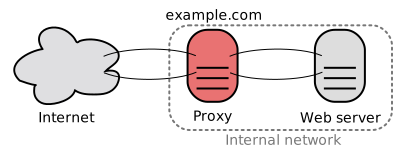
- 2. Adding a new API results in adding application servers without necessarily adding additional web servers.
- 3. Small teams with small services can plan more aggressively for rapid growth.
- The single responsibility principle advocates for small and autonomous services that work together.
- 4. Workers in the application layer also help enable asynchronism.
- Related to this discussion (of the application layer) are microservices, which can be described as a suite of independently deployable, small, modular services.
- Each service runs a unique process and communicates through a well-defined, lightweight mechanism to serve a business goal.
- user profile
- follower
- feed
- search
- photo upload, etc.
- Systems such as Consul, Etcd, and Zookeeper can help services find each other by keeping track of registered names, addresses, and ports.
- Health checks help verify service integrity and are often done using an HTTP endpoint.
- Both Consul and Etcd have a built in key-value store that can be useful for storing config values and other shared data.
- Adding an application layer with loosely coupled services requires a different approach from an architectural, operations, and process viewpoint (vs a monolithic system).
- Microservices can add complexity in terms of deployments and operations.
- Encrypt in transit and at rest.
- Sanitize all user inputs or any input parameters exposed to user to prevent XSS and SQL injection.
- Use parameterized queries to prevent SQL injection.
- Use the principle of least privilege.


In short, by sanitizing + escaping + validating user input.
